Showing posts with label WhatsApp. Show all posts

Tuesday, April 7, 2015

Facebook Beta would integrate a button to share on WhatsApp

Many questions arose after the purchase of WhatsApp by Facebook. WhatsApp has a great usage share, so that the main suspect was always that Facebook absorbed the company to consolidate its influence in the mobile market, but a new rumor claims that WhatsApp could be integrated into the new Facebook application, fueling suspicions.


There are new screenshots of what could be the new Facebook application in version 31.0.0.7.13 where there would be few changes from the current version, but with a very important detail, which would integrate with WhatsApp, as suggested the following screen.
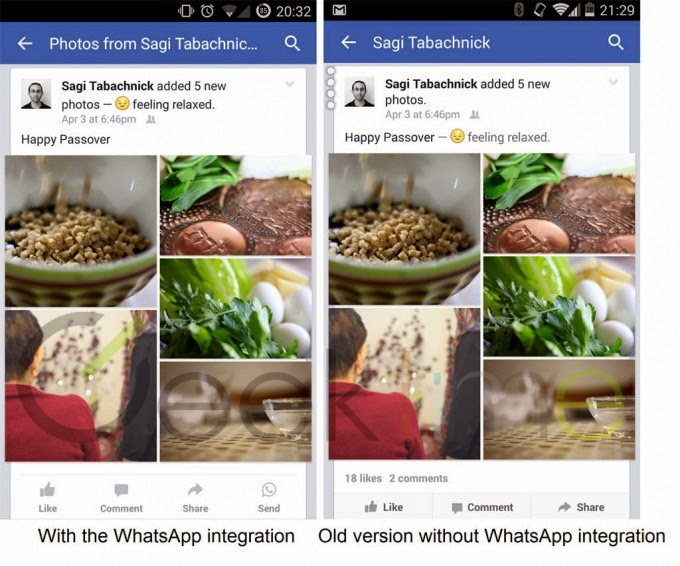

In this screenshot, we see a redesign buttons: Like, Comment and Share away from the visual style we know from Facebook while giving space to a fourth button, which is sent via WhatsApp. After pressing this button it would take us to our list of contacts and groups in Whatsapp, to post our favorite publications from Facebook.


Looking at the last capture, we realize that the procedure for share posts by facebook is similar to the traditional way in which shared content into any other application in the case of a simple shortcut by which Facebook would prioritize chat service bought for 19,000 million dollars against other applications, including Facebook Messenger.

Remembering the conference last week Facebook Messenger not only has not been abandoned to the detriment of WhatsApp, but continues to evolve as a result more than WhatsApp, generating us questions about the Facebook strategy of maintaining two competing services including.

Source: Geektime

Facebook Beta would integrate a button to share on WhatsApp

Friday, March 27, 2015

WhatsApp will save a backup on Google Drive


WhatsApp is the IM app with more users worldwide. The last months, they have been improving the options offered, and the most important one was the possibility of making voice calls.

Now, they are moving a step forward, adding another highly expected feature: an easy way to get a backup.

Currently, you can save a backup of your current conversations a media files exchanged through WhatsApp by following a few instructions. You need to make a copy of your history, move it to the SD card or to another device, and them move it back to your phone after the new app has been installed. Then you should be able to restore all the information and get all the information back to your phone.


However, many people don't want to invert such time and effort to simply keep the information back, or they simply doesn't know how to deal with moving files on their phones. So, here comes the good news.

WhatsApp will implement a simple an easy way to keep a copy of your conversations and media files (except videos) on Google Drive. So, if we need to get a new phone, it will be much easier to get all the information back in the very same way we had in the previous device.


The news has been published on AndroidPolice and confirmed by the dutch site DroidApp.nl, who published some pictures showing part of the new features. You can define if you want to keep the copy on Google Drive o not. In addition, you can also choose to do the backup only through Wi-Fi connection, in order save your data.

Once you install the app on a new device, you will be faced with the choice to restore or not the backup on the new device. In decided not to restore it, the copy will be permanently deleted.


This news are not official, so, they are currently hardly more than rumors. There is no timeframe announced, so it might still take a while until we have this possibility activated on our phones.

Source: AndroidPolice.


Sunday, February 15, 2015

Disa: unified messaging of WhatsApp and SMS

Disa wants to be the center of mobile communications services for different Android devices. Years ago, we had to resort to multiprotocol messaging client for desktop systems to participate in multiple messaging services when we had user account.


Now it is likely that our messaging communications have led the mobile devices, and to the many services that can participate, and to avoid having to use multiple applications and go crazy to choose one in which we want to respond to a new message received or send one of ours, Disa is a current solution for Android devices and just launched its public Beta after passing through its Alpha phase and its private Beta.

Disa has integrated SMS messaging through official support and plugin to Facebook, but also allows the use of third-party plugins to expand the possibilities. Researching it can find the availability or development of third party plugins for services as WhatsApp, Telegram, GroupMe, Hike, Line, etc. Disa also is developing other official plugins for other messaging services to be launched in the coming months.


Best of all is that all discussions of the various services will be under the same application, which will impact positively on the battery life of mobile devices having fewer open applications, among other benefits. Use of Material Design or support for other formats beyond text messages are other qualities of this promising mobile application.

Among other features, we will see the configuration options that allows us to modify some parameters, such as Back Press, notifications, Fast Service Switch, the latter offers the possibility to change the service using a unified chat and text messaging WhatsApp.


Besides all this, we can activate emojis or stickers, and more. The services section (WhatsApp or SMS) allows us to modify colors of each for easy identification, and best of all, we can use different colors for incoming and outgoing messages, making our conversation fun and friendly.

Before unified messaging applications must check the APN Operator for the SMS service, and verification of WhatsApp, but not have to worry as Disa automatically detects the APN, so it saves us time and work, but we modify it manually.
To verify the number of WhatsApp we are using we must indicate the country and our number, then enter the verification method call or SMS. After completing this process, we can chat in comfort with our friends in WhatsApp or SMS messages.

Disa: unified messaging of WhatsApp and SMS

Saturday, January 31, 2015

WhatsApp calling feature is here for some users

WhatsApp may be finally close to release their calling feature. It has been rumored for quite a long time now, but it seems that they have started to try the service with a few users.

After receiving the call from a friend, Reddit user pradnesh07 has get the feature enabled on his phone. He supposed that it was a kind of invitation like system, so he started to call his friends to give them the calling option.

However, it's not as straightforward as it seems. Some of his friends get the feature but some others didn't. You need to fulfill some requirements to get the calling feature updated. On one hand, you must have the latest version available of the app, which is in their website and not on the Google Play. It means installing the apk file.

After some tests, pradnesh07 has managed to activate the feature with people from India using a Nexus 5 with Android 5.0 Lollipop. It's not clear yet if it works in other countries or other devices, but it's probably a matter of days before the company announces something officially.

If you have a look at these images, you will see the new tab for the calling service and the design of the new interface.


Just a few days ago WhatsApp announce their support to web browsers, a news expected for a great number of users. Web browser compatibility was offered for some of their competitors, and the same happens with calling features. Hangouts, Viber or Skype has been offering it for quite a long time now, so WhatsApp users will finally be able to use the calling service in a similar way.

If you are interested in VoIP calls, keep an eye on the news because WhatsApp is probably very close to make the international release.

Source: Reddit.

Via: AndroidPolice.


Thursday, January 29, 2015

WhatsApp comes to Computers via web browser, finally

Having Whatsapp on your computer has been one of the options that lots of users has been missed in this instant messaging app from its popularization. Their main rivals give that option so it was expected the most used service on the world, with over 700 million active users per month, implemented this possibility sooner rather than later.


After rumors of recent days and even a controversy by blocking third-party applications, WhatsApp on your computer is already a reality. It comes via web browser and in a rather curious way. If you want to know how to use WhatsApp on your computer, here you have all the information you need.

WhatsApp is already accessible from the web but is not yet a cloud service and remains messaging does not store messages except the backup that occurs as an option in mobile applications.


This operation until now had used third-party programs that promised to use WhatsApp from the computer. And it is precisely the basis that the company used to implement its path to the Desktop. No changes in app philosophy for now.

This WhatsApp for computer connects to your smartphone and replicates the content on their website. Basically we have an alternative browser on the smartphone window, but only that.


The technology used is WebRTC, for now it is only available for Chrome browser, both Desktop and other devices also support it. To use it we have also enabled on an Android smarpthone, Blackberry or Windows Phone service. If you use iPhone, for now it is not a service you can access yet.

So, if you have an Android smartphone, Windows Phone or Blackberry, and open the Chrome browser, here is how you can configure everything to use WhatsApp on PC.


WhatsApp comes to Computers via web browser, finally