Thursday, May 19, 2016

KingRoot: الروبوت الهاتف والكمبيوتر اللوحي (Root Androd in arabic)


اتبع هذه الخطوات لفتح صلاحيات الجذر بجهاز أندرويد الخاص بك، وذلك باستخدام KingRoot، هذا إن كان إصدار أندرويد لديك بين الإصدارين أندرويد 4.2.2 (جيلي بين) وأندرويد 5.1 (لولي بوب).


ويشمل هذا التطبيق جميع طرق ROOT

قُم بعمليات جذرية على جهاز أندرويد الخاص بك

  1. تأكد من تمام شحن بطارية جهاز أندرويد لديك، أو من كونها مشحونة بنسبة 50% على الأقل.

  2. [يُنصح بذلك] ارفع نسخة احتياطية من بياناتك الشخصية، مثل جهات الاتصال والرسائل والصور والفيديوهات والتطبيقات،...

  3. تأكد من أن الجهاز من الوصول إلى الإنترنت أثناء عملية ROOT.

  4. تأكد من أن جهازك يمكنه الاتصال بالإنترنت أثناء عملية فتح صلاحيات الجذر.

  5. قُم بتنزيل حزمة APK الخاصة بـ KingRoot، من هنا

  6. لا يمكننا عرض روابط التنزيل المباشرة وذلك بمقتضى سياسة جوجل. ها هي الصفحة التي منها يمكنك الحصول على معلومات التنزيل الخاصة بهذا المنتج.

  7. انتقل على الإعدادات>الأمن> ثم قُم بتمكين خيار "موارد غير معروفة".


  8. kingroot unknown sources hexamob

  9. اسحب شريط الإخطارات لأسفل وانقر على إخطار تنزيل Kingroot، للتثبيت.


  10. kingroot notification bar hexamob

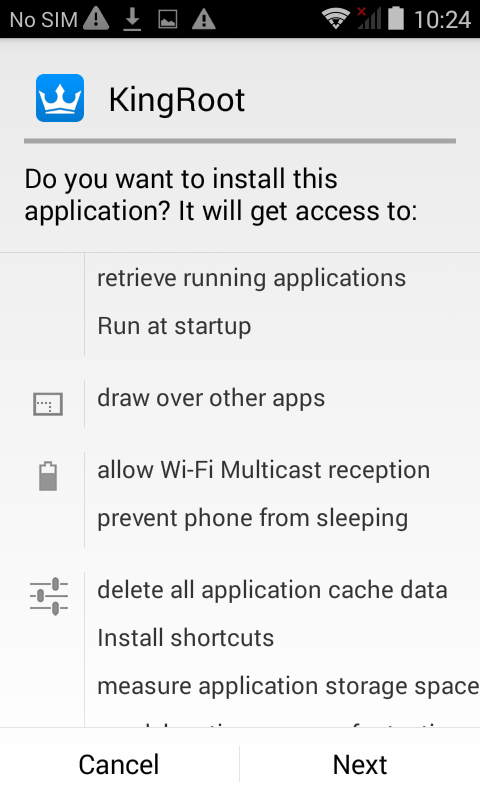
  11. Click Next, Install and Open

  12. انقر على التالي وعلى تثبيت وعلى فتح


  13. kingroot install hexamob

  14. عند الدخول إلى التطبيق، مرر الشاشة لأسفل وانقر على زر "جربه".


  15. kingroot try it button hexamob

  16. سيتحرى Kingroot عن كون جهازك مفتوح صلاحيات الجذر أم لا.


  17. سَيُشير Kingroot إلى أن جهازك غير مفتوح صلاحيات الجذر. انقر على زر "جرب الجذر" لفتح صلاحيات الجذر عليه. قد يُعاد تشغيل جهازك خلال هذه العملية .. فلا تقلق.


  18. kingroot rooting hexamob

  19. بمجرد اكتمال هذه العملية، قُم بالتحقق من أن جهازك قد تم فتح صلاحيات الجذر عليه بنجاح عن طريق تطبيقنا "جذر جميع الأجهزة"، وذلك بالنقر على القُفل الذي يظهر أسفل الشاشة على اليسار.


  • إذا فشل Kingroot فهذا يعني أن جهازك غير متوافق معه، ويمكنك حينها استخدام أسلوب آخر لفتح صلاحيات الجذر، من الأساليب الموجودة في تطبيقنا "جذر جميع الأجهزة".


  • kingroot failed rooting hexamob
    تنزيل

    تذكر أنه يجب عليك فتح الصلاحيات الجذر على جهاز الأندرويد لديك، تحت مسؤوليتك أنت.

    الموارد


    الشروط القانونية

    Hexamob غير مسؤولة عن أي أضرار تحدث، سواء كان ذلك بشكل مباشر أو غير مباشر، جراء أي وسيلة من وسائل فتح صلاحيات الجذر. أنت تقوم بأي عملية من عمليات فتح صلاحيات الجذر على جهازك تحت مسؤوليتك أنت فقط.
    ننصحك بقراءة جميع التعليمات الخاصة بكل أسلوب من أساليب فتح صلاحيات الجذر، وباتباع هذه التعليمات خطوة بخطوة، كما هو مشارٌ إليه من قبل المطورين. إذا كان لديك أي سؤالٍ أو تحتاج لدعمٍ ما، ستجد في كل صفحة من الصفحات روابط خاصة بمطوري كل أسلوب من الأساليب.

    أسلوب فتح صلاحيات الجذر لأندرويد، KINGROOT

    Kingroot : Rootear celulares y tablets Android


    Kingroot es una aplicación creada para Android y que se puede utilizar para obtener acceso root en muchos celulares / moviles y tablets con sistema operativo Android.Para rootear con Kingroot sigue estas instrucciones si la version de tu dispositivo Android está entre Android 4.2.2 (Jelly Bean) y Android 5.1 (Lollipop).


    Esta aplicación incluye todos los métodos de ROOT.


    Instrucciones desde tu Android


    1. Asegúrate de que tu dispositivo Android está cargado al menos con un 50% de batería.
    2. [Recomendable] Hacer una copia de seguridad de todos los datos de tu dispositivo incluyendo contactos, mensajes, aplicaciones, etc...
    3. Asegúrate de que tienes acceso a Internet durante todo el proceso de rooteo y con todos los drivers actualizados en el teléfono.
    4. Descarga la APK de KingRoot
    5. Debido a politicas de Google no podemos suministrar enlaces de descarga directa. Aquí te mostramos la página donde encontrar información sobre el producto y descargarlo.


    6. Ve a Ajustes -> Seguridad -> y comprueba en "Fuentes desconocidas" que te permita instalar aplicaciones fuentes desconocidas.

    7. kingroot unknown sources hexamob
    8. Arrastra la barra de notificaciones hacia abajo y haz clic sobre la notificacion de descarga de Kingroot para instalar


    9. kingroot notification bar hexamob
    10. Clic Next, Install and Open

    11. kingroot install hexamob
    12. Al entrar en la aplicacion desplazate hacia abajo y haz clic en el boton "Try it".

    13. kingroot try it button hexamob
    14. Kingroot comprobara si el dispositivo esta rooteado


    15. Kingroot te indicara que tu dispositivo aun no esta rooteado. Haz clic en el boton "Try root". Tu dispositivo podria reiniciarse durante el proceso...no te preocupes.


    16. kingroot rooting hexamob
    17. Una vez finalizado el proceso comprueba con la app "Root all devices" si tu dispositivo esta rooteado correctamente haciendo clic en el candado que aparece abajo a la izquierda.


    18. Si Kingroot falla significa que tu dispositivo no es compatible con Kingroot. Puedes utilizar otro metodo de root disponible.


    19. kingroot failed rooting hexamob

    Descargas


    Recuerda, debes hacer ROOT a tu dispositivo Android bajo tu propio riesgo.

    Download Android USB Drivers app

    Fuentes


    Condiciones legales

    Hexamob no se hace responsable de los daños causados directa o indirectamente por un método de rooteo. Toda acción a este respecto sobre su dispositivo la están haciendo sólo bajo su responsabilidad.
    Le recomendamos que lea todas las instrucciones relacionadas con cada método de rooteo y seguir paso a paso las instrucciones indicadas por los desarrolladores. Si usted tiene preguntas o necesita ayuda en cada página hay enlaces a los desarrolladores de cada método en la sección Fuentes.

    Método de root KINGROOT

    KingRoot : Root Android phones and tablets


    Kingroot is a rooting app that allows us to give root permissions with just a click on the devices we want. Follow these steps to ROOT your Android device with KingRoot if your Android version is between Android 4.2.2 (Jelly Bean) and Android 5.1 (Lollipop).


    This app includes all ROOT methods.

    Root from your Android device


    1. Make sure your Android device is full charged or at least with 50% of battery charge.

    2. [Recommended] Make a backup of your personal data like contacts, messages, photos, videos, apps,...

    3. Make sure your device have access to the Internet while ROOT process.

    4. Download KingRoot APK
    5. Because of Google policy, we can’t show direct download links. Here is the page to find and download information about the product.
    6. Go to Settings>Security> and enable "Unknown sources" option.

    7. kingroot unknown sources hexamob
    8. Drag the notification bar down and click on the Kingroot download notification to install

    9. kingrootm03
    10. Click Next, Install and Open

    11. kingroot install hexamob
    12. When entering the application scroll down and click the button "Try it".

    13. kingroot try it button hexamob
    14. Kingroot will check if your Android device is actually rooted.


    15. Kingroot will indicate that your device is not yet rooted. Click the "Try root" button to root it. Your device might restart during the process ... don't worry.

    16. kingroot rooting hexamob
    17. Once the process is complete check with the app "Root all devices" if your device is rooted successfully by clicking on the padlock that appears below left.


    18. kingroot failed rooting hexamob

    Download


    Remember, you must ROOT your Android device at your own risk.

    Sources


    Legal conditions

    Hexamob is not responsible for any damages caused directly or indirectly by a rooting method. Any action for rooting your device is done it only under your responsibility. We recommend that you read all the instructions related to each root method and follow them step by step as indicated by the developers. If you have any question or need support, on every page there are links to the developers of each method.

    Android rooting method KINGROOT

    Saturday, August 15, 2015

    Custom ROMs reach Android Auto

    We love the custom ROMs because they provide a greater variety when choosing the operating system that we like for our phone. With the arrival of Android, Android Wear and Auto, we believed that these versions for cars and wearables would be a closed environment, and fortunately we were wrong.


    Android Auto is currently in few navigation systems, which are quite expensive in general terms, making Android Auto as an overrated product today. One of the main Android Auto manufacturers is Pioneer, whose range AVIC offers in equipping cars and carplay Android Auto.

    In these devices, it has discovered a security hole from which you can install unofficial systems from SD card, giving users the opportunity to install custom ROMs. Using a mod of AVIC development tools, users can change the Android Auto ROM to make the most of Android in the car. These tools allow you to turn the WiFi of AVIC, to change the default launcher, Play Store to install and change the look of the interface, for now.


    If you're one of the few Android Auto users with access to a AVIC, today may be your lucky day. As always we remind you that you are responsible for what happens in your device, and a navigation system unstable can cause unnecessary distractions behind the wheel.

    Custom ROMs reach Android Auto

    Thursday, August 13, 2015

    Fallout Shelter now available on Android

    If you belong to the user group that was willing to take Fallout Shelter on Android at last you're in luck: it is already available in Google Play, giving us the opportunity to lead our own shelter in the role of Vault-Tec supervisors.


    Fallout 4 stands as one of the possible games of the year, and Bethesda made a presentation back in E5 2015 (first appearance at E3, of course): they put the honey on the lips, and said anything else until later this year. Luckily, they did bring us a small advance in the form of mobile game, a game that puts us as a supervisor at one of the many nuclear shelters built by Vault-Tec.

    Unfortunately, Fallout Shelter has been a temporary in exclusivity for iOS, for technical reasons in the words of Bethesda. Luckily, they promised they would bring the game to Android, and have kept his word, because we already have Fallout Shelter available for Android.


    The trailer for Fallout Shelter and shows us all what we will find, with the post-nuclear ambience so typical of Fallout we could enjoy all the titles, but if we summarize it: this is a game with freemium touches they give us a basic shelter, and our work is to grow and prosper. iOS version has achieved success, becoming one of the best releases made in the App Store, and now we can test it on our Android.

    Fallout Shelter now available on Android

    Wednesday, August 12, 2015

    Firefox 40 for Android comes with more performance, security and corrections

    It is not a major upgrade for Firefox, but it solves some errors that needed man hand to be solved and that also brings a couple of new features for use.


    First, the update adds protection against downloads of unwanted software that can affect the security of our terminal. As in the desktop version, a warning if we agree to a potentially dangerous site will appear notifying the risks and we act according to our need.

    On the other hand, if we do a long press on the buttons back and forth in the navigation menu, now history will appear previously visited pages for quick access without having to go before unnecessarily.

    Regarding bug fixes, now the .jpg images are handled with lower processing power and require less memory, which improves performance and minimal autonomy of the terminal.


    Desktop version is more difficult to determine which browser is more powerful, efficient and safe, but we can say that Firefox is one of the best alternatives on Android and contains features that Chrome does not have, such as extensions or Wndowis 10 support, quite and necessary and should be implemented. All changes can be found in the release notes for Firefox 40 on the official website.

    Firefox 40 for Android comes with more performance, security and corrections